Using DSN Tools in CX Enterprise Coworker
DSN Plugin for CX Coworker
Overview
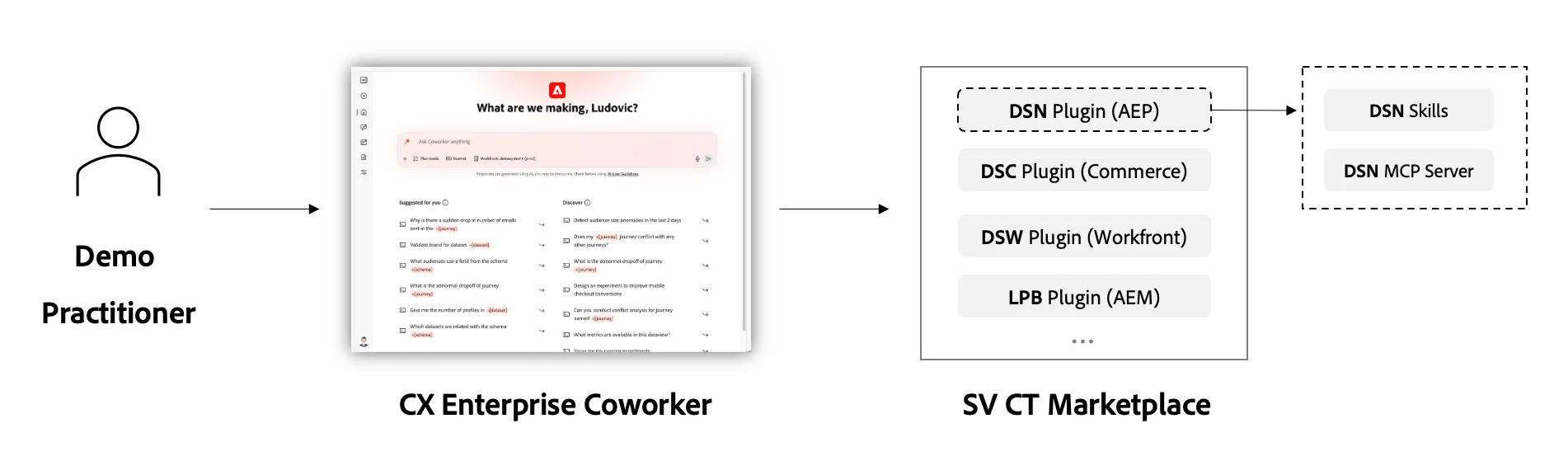
The DSN Plugin (Demo System Next) is a powerful addition to Coworker via the CT Marketplace that enables Adobe demo practitioners to configure, generate, and manage demo environments directly from a conversational interface. It eliminates the need to navigate multiple UIs — you simply tell Coworker what you need, and it handles the rest.
Availability
Currently above plugin is available ad existing in the below orgs.
Adobe Demo System, Adobe Demo System Individual, Adobe Demo System Shared, Adobe Demo Americas 256, Demo EMEA.
Please contact us if you need them to be installed on another Orgs.
Capabilities
1. IMS Org & Sandbox Management
- List orgs — View all IMS organizations you have access to
- Onboard new orgs — Register a new IMS org with Demo System Next
- Update existing orgs — Modify org configurations
- Assign/unassign AEP sandboxes — Connect or disconnect sandboxes from an org
2. DSN Project Creation
Create demo project shells for different platforms:
- Web projects — Browser-based demo experiences
- Mobile projects — iOS/Android demo apps
- CX App projects — Customer experience applications
- External website projects — Third-party integrations
3. Environment Configuration (AEP & Beyond)
Run full environment setup jobs that install schemas, datasets, and configurations:
- configure_dsn_aep — AEP schemas, datasets, and identity namespaces
- configure_offers — Decision management offers and placements
- configure_exd — Experience Decisioning setup
- configure_launch — Data Collection / Launch properties and rules
- configure_ajo_journeys — Journey Optimizer journey templates
- configure_sources — AEP source connectors
4. Demo Data Import
- import_demo_data — Push pre-built demo datasets (profiles, events, transactions) into your sandbox
5. B2B Synthetic Data Generation
Generate realistic B2B demo data at scale:
- generate_b2b_data — Create synthetic accounts, opportunities, persons, and activities
- lookup_b2b_account — Find existing B2B accounts
- preview_b2b_data / download_b2b_data — Inspect or download generated data
- ingest_b2b_data — Push generated B2B data into AEP datasets
6. Profile Personalization
- fetch_profile_personalization_profile — Look up a customer profile for demo personalization
- profile_personalization_field_workflow — Update profile attributes for real-time demo scenarios
7. DSN Workspace Management
- get_dsn_workspaces — List your DSN workspaces
- get_dsn_configure_catalog — Browse available configuration presets (industries, variants, channels)
8. Readiness Check
- check_demo_system_next_readiness — Verify your environment is ready for DSN operations
Examples
Example 1: Configure a Full Retail Demo Environment
Coworker will:
- Confirm your org and sandbox (or let you pick a different one)
- Fetch the DSN configured catalog to find retail presets
- Ask which variants and channels you want (e.g., Luma brand, email + push + web)
- Ask for a title and workspace preference (new, existing, or none)
- Run configure_dsn_aep to install schemas and datasets
- Run import_demo_data to populate the environment with retail demo profiles and events
- Optionally run configure_offers and configure_ajo_journeys to complete the setup
Example 2: Generate B2B Data for a Financial Services Demo
Coworker will:
- Resolve your org and sandbox
- Confirm you want 5 new accounts (no existing accounts to reuse)
- Ask if you want to include a named persona
- Collect generation parameters: industry (Financial Services), country, date range, volume
- Kick off generate_b2b_data and poll until complete
- Show you a summary of generated entities (accounts, opportunities, persons, activities, relations)
- Offer to ingest the data into AEP or download it as a ZIP
Example 3: Create a DSN Mobile Project
Coworker will:
- Confirm your org and sandbox
- Ask for workspace preference (new / existing / none)
- Create the project shell via create_dsn_projects with type = mobile
- Return the project details and workspace ID for any follow-up configuration
Example 4: Look Up and Update a Demo Profile
Coworker will:
- Resolve org and sandbox
- Call fetch_profile_personalization_profile to retrieve the current profile
- Show you the current state
- Run profile_personalization_field_workflow to update the loyalty tier field
- Confirm the update was applied
Example 5: Check What's Installed and Browse Available Presets
Coworker will:
- Call get_dsn_configure_catalog
- Display all available presets grouped by category (Retail, FSI, Travel, Healthcare, B2B, etc.)
- For each preset, show which variants and channels are included
- Let you pick one to configure if you'd like to proceed
Key Concepts
Concept | Description |
|---|---|
DSN Workspace | A container that groups related projects and configurations together |
Variants | Brand/industry-specific content packages (e.g., Luma, Carvelo, Frescopa) |
Channels | Communication channels to configure (email, push, SMS, web, in-app) |
Presets | Pre-built combinations of variants + channels for common demo scenarios |
Configure Jobs | Long-running operations that install schemas, data, and configs into a sandbox |
Tips
- First-time setup? Start with check_demo_system_next_readiness to verify your environment.
- Multi-job workflows: The first job creates a new workspace; subsequent jobs reuse it via workspaceMode: existing.
- B2B data generation supports existing accounts — you can look them up first and add new contacts/opportunities to them.
- Configure jobs take 1–3 minutes — Coworker will poll and notify you when done.
- Read-only sandboxes (public-luma, public-frescopa, etc.) cannot be written to — use your own sandbox for configuration.
Getting Started
Simply tell Coworker what you need:
"Set up a DSN demo environment for travel & hospitality"
"Generate B2B data for my sandbox"
"Create a web project for the Summit keynote demo"
"What DSN presets are available?"
Coworker handles org/sandbox resolution, input collection, job execution, and status polling — all conversationally.