Parter Data: Offise prospecting for new Customers
Before you will start this demo please read this article: Partner Data
IMS Org: Adobe Demo System Shared, sandbox: public-securfinancial
This is best to be used after you’ve laid out the core foundational framework of the product (Sources, XDM, Identity Resolution, Governance, Profiles, Segmentation and Activation).
When possible, understand the partners your customer works with to update your talk track to use that partner’s name/ID, or customize your demo data as needed in your own sandbox.
INTRO:
Now that customers are able to ingest partner data into the RTCDP, I’m going to take you through a workflow of how to ingest a file of new prospects that I want to target for an upcoming media campaign.
These would be people that I haven’t seen before, so all pre-visit scenarios, and as a customer you’d work with your data partner of choice to access this file to load into RTCDP.
To start, I’m going to talk about a new identity we created to support these partner use cases.
This identity namespace is not stored on the identity graph, meaning that any data you ingest into the system with this identity namespace as the primary identity will not be associated to any 1P data you have – they will be kept separate.
This is important to note as data and identity partners often use probabilistic logic/models in their identity graphs, which may not be very stable and churn/drift over. Time. By contract, RTCDP focuses on building a precise view of people to avoid inappropriate personalization, incorrectly merged profiles, and minimal churn in reporting.
This nuance allows customers to ingest partner-provided profiles against the Partner ID namespace, and continue ingesting their 1P data against the known identifiers, like email, CRM ID, phone number etc.
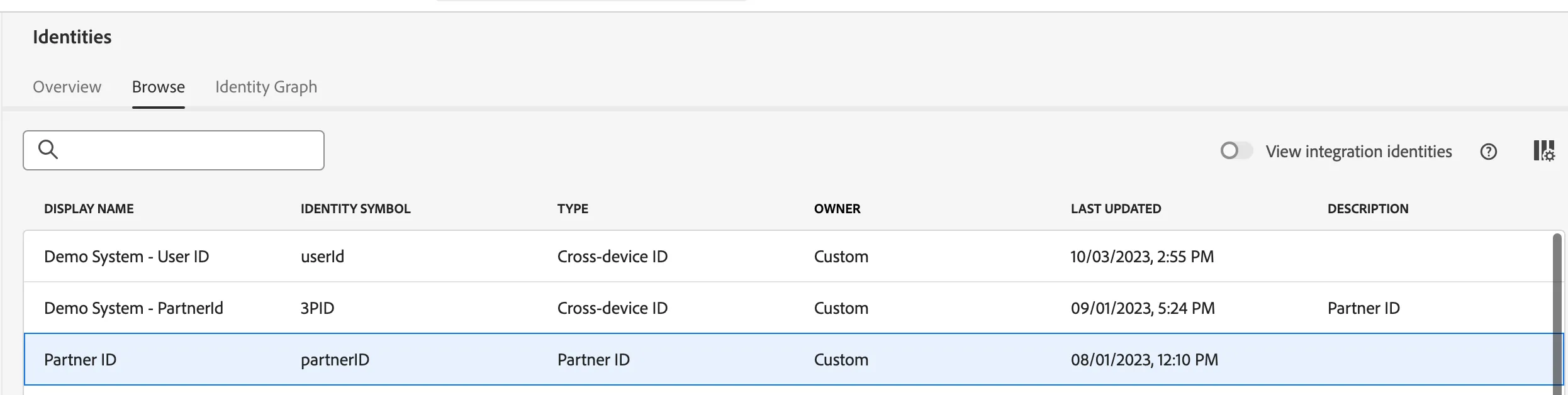
In this demo we have FSI partner identifier that we’ll use as our 3PID
Go to the identities section https://experience.adobe.com/#/@demosystem4/sname:public-securfinancial/platform/identity/browse?limit=50&page=1&sortDescending=1&sortField=updateTime
Present the Partner ID identity type
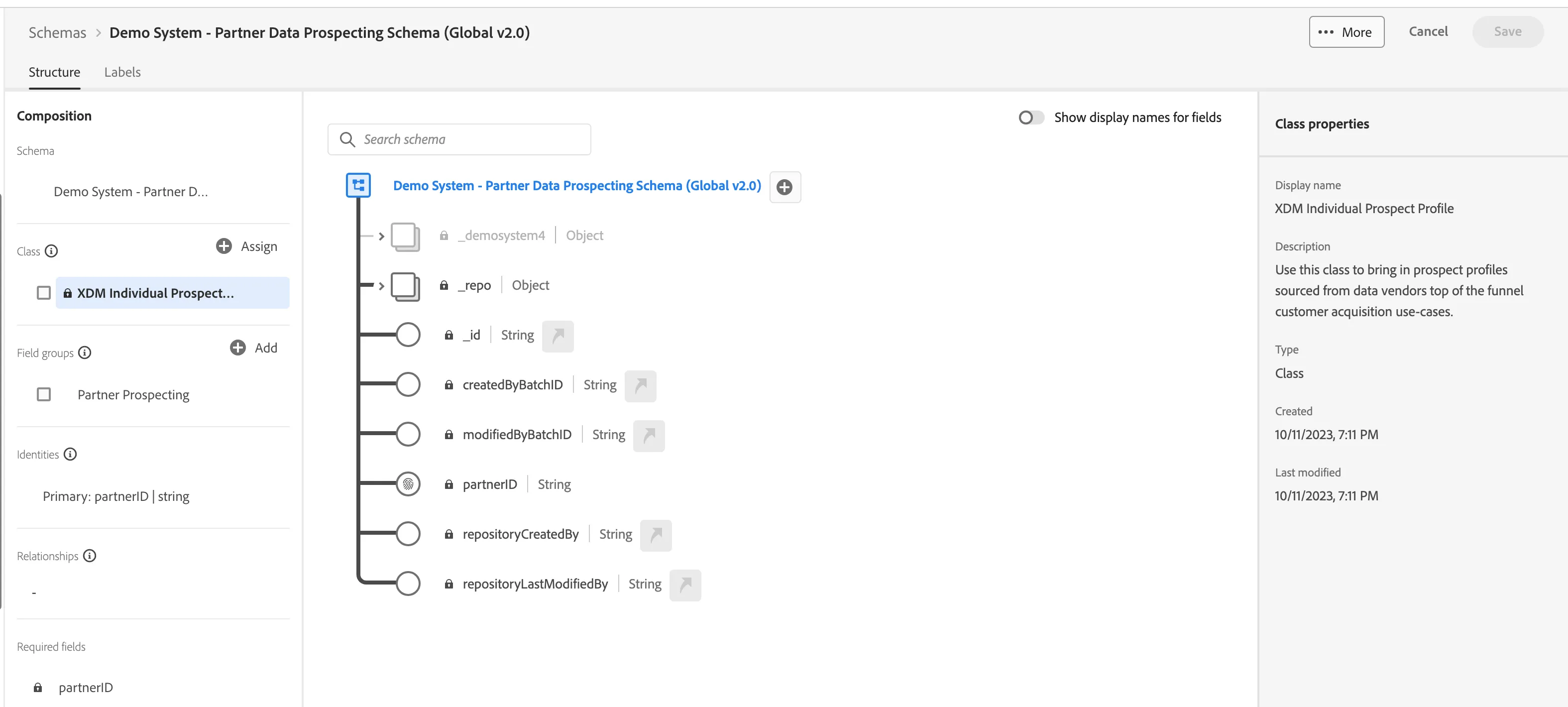
Now I’m going to create/talk about a new schema. As you know, we need a schema to properly organize the data in the CDP against our XDM (common data structure) and make it readily available for downstream use.
To support this new use case, we created a new class of schema that we’re calling prospect profile.
This allows us to ingest the partner profiles and treat them as profiles in our system for use in segmentation, apply governance and activate, but we’re not allowing these profiles to be stitched to your 1P data points or identities.
Adobe’s product design ensures clean separation between your high fidelity 1P data and vendor soured prospect data. This aligns with our commitment on approaching prospecting responsibly and putting the proper guardrails in place to contain prospect data and workflows.
As prospects progress in their consideration cycle and become known to the brand, RTCDP starts to build a comprehensive profile on them in the 1P universe.
I'll show you later on in the demo how these are kept separate in our system.
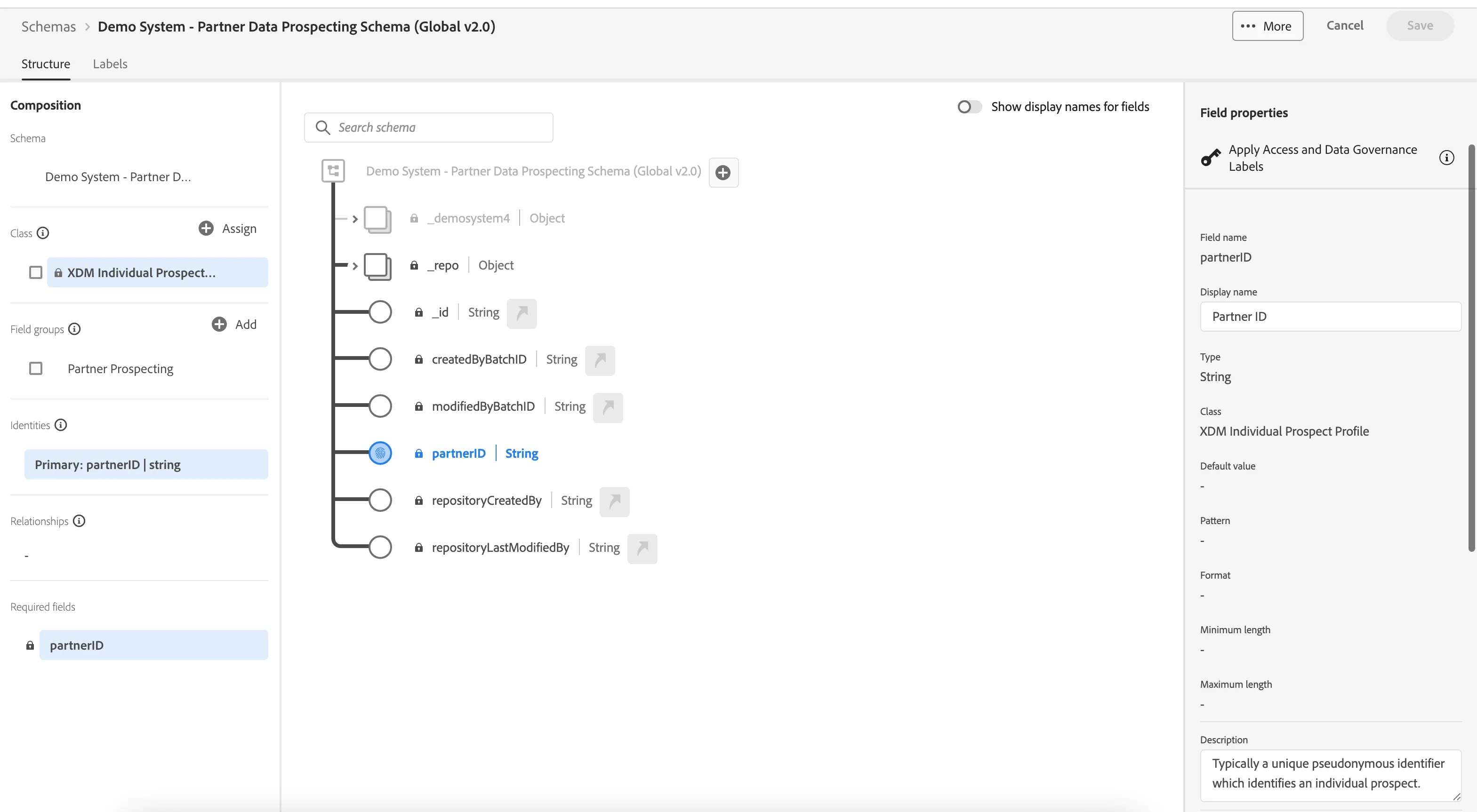
Within this schema, I have partner ID as the partner identity namespace – this means that the data file I’m getting from my data partner is sending an ID I can then use to target people with wherever that partner ID is accepted.
In this example, you can see the attributes I’m getting from my data partner – demographic data points, FSI specific ones, interests etc.
It’s best practice to create a schema, or field group, per data partner you work with, if you work with multiple. That way, it’s easier to name overlapping attributes and trace them to the right partner, as well as modify them depending on any upstream changes that occur without needing to change the entire workflow for all partner relationships.
We’re working with the data providers to create their own field groups for more efficiencies for our customers – so that in the future when you create a schema for [partner they work with], you can simply select the field group that contains all the attributes [partner] would be sending in their file to you.
- Mention the new class of the schema:XDM Individual Prospect Profile
- Highlight the partner ID as the primary identity and call out that the prospect class is by design restricted to only namespaces that are noted as ‘partnerID’
- Speak to the partner data attributes being ingested
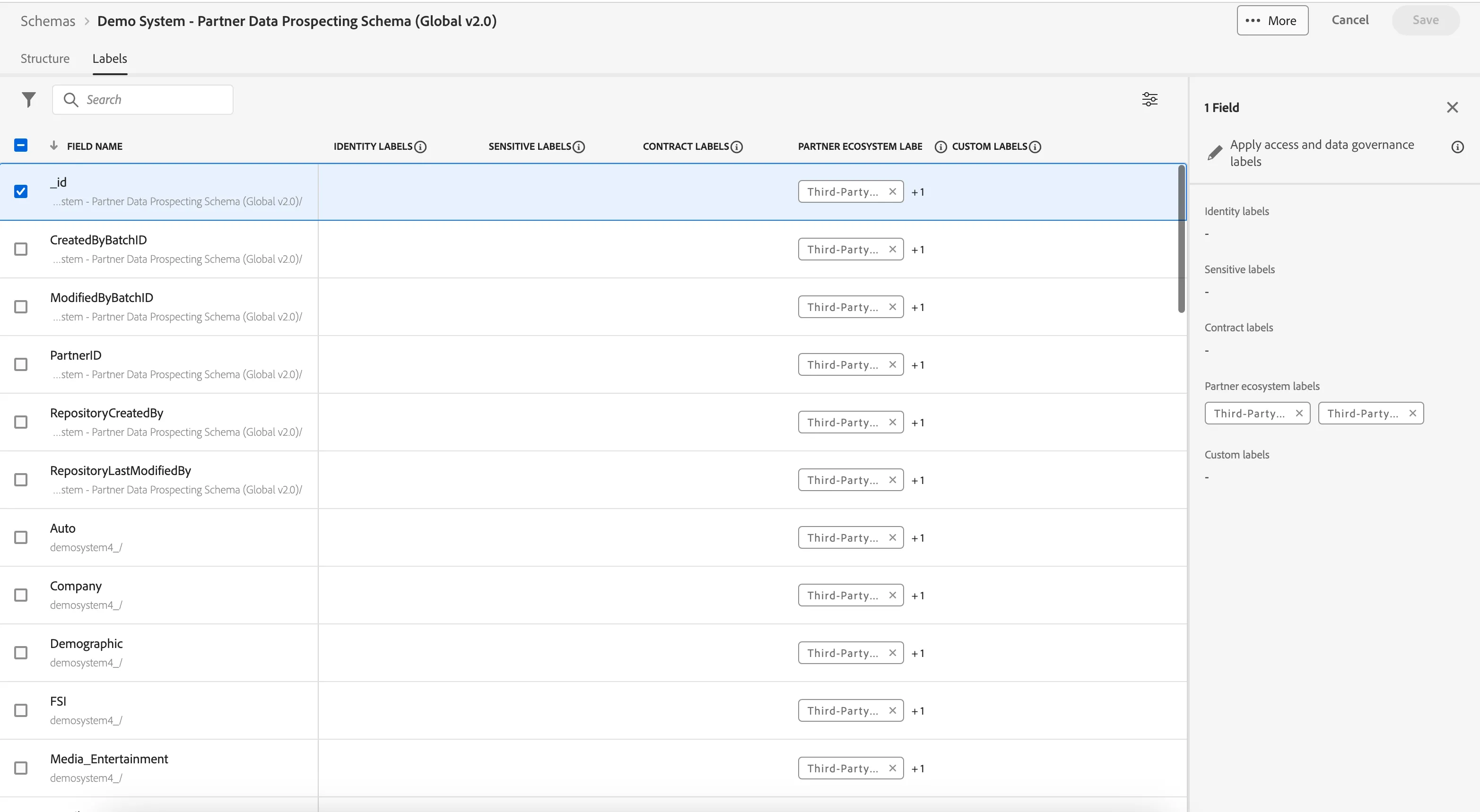
From a governance perspective, we have a new data label category called ‘Partner Ecosystem Labels’ – the same benefits you expect from our DULE framework on 1P data also apply to partner data. We’ll see the expansion of new labels in this category over time to accommodate new use cases.
Customers can apply this label that’s OOTB in the RTCDP called ‘Third-Party’ to any data they ingest from a data partner.
This allows for governance policies to be created so data activation is restricted based on the marketing action and the governance label associated.
In this example, we’re saying that any data from the partner with the ‘Third-Party’ label can’t be used for email marketing or data science initiatives.
- Click on ‘Labels’ next to structure at the top of the Schema
- Point out the new category of partner ecosystem labels and click the ‘I’ icon and speak to the below, showing that all data in this schema has this label and why
- Click on policies and click on the ‘3P data usage’ policy and speak to it

Once a schema is created, you’ll want to create a dataset based off of that schema so you can observe that data once it’s been given meaning.
Within the datasets tab, there is a monitoring view for the ingestion patterns as well.
- Click on datasets
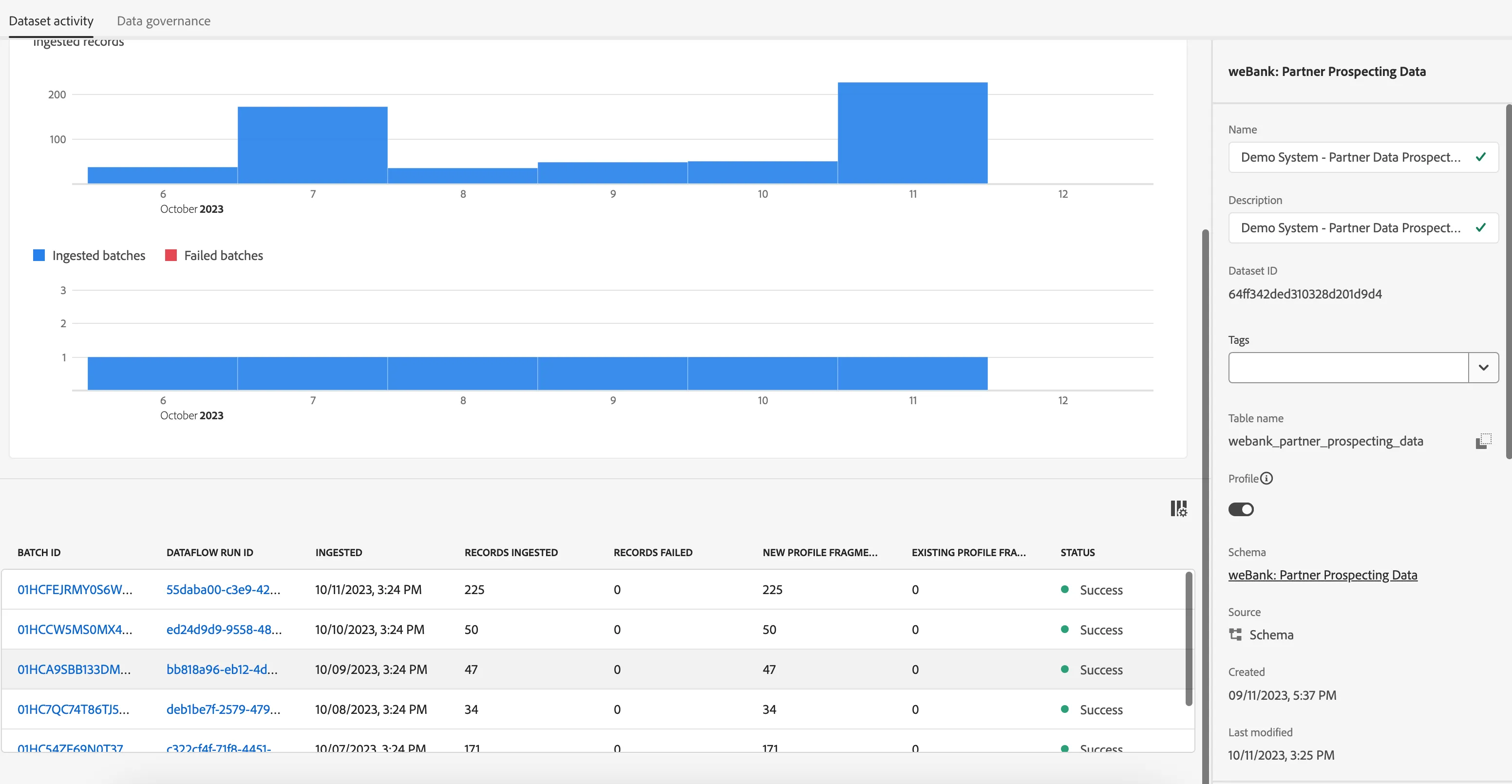
Now that we have our partner ID created, the prospecting schema and dataset, we’re able to load in our partner data file.
Streaming ingestion is not supported for partner data, but all file-based ingestion pathways are!
Customers can ingest data using one of our source connectors and since we’re ingesting partner files, we’re likely talking about the s3 or SFTP for this use case.
- As this is a read only instance, you don’t need to showcase the sample data ingestion workflow and can instead talk through all of this in as much detail as you need while explaining how source connectors work, even showcasing the s3 workflow
- If you are using your own sandbox generate the profiles using dsn data generator tool
Since the partner data file is loaded into the system, I’m going to show you what the prospect profiles look like
You’ll notice in the left-hand rail navigation a new section called ‘Prospects’ has been added. These profiles are kept separate from the 1P profiles you have, so while they’re in the data lake with the 1P data, the lookup is based off of the partner ID namespace which is not on the identity graph. Profile service holds prospect data in a separate collection. Event data is not supported because there’s no use case for time-series partner data to be supported. That’s why in this profile view, we don’t see the identity graph and why there’s no event data, time series data associated.
This schema is only meant to support partner IDs as well as a list of attributes.
However, like the 1P profile viewer, we are able to see segment membership of these 3P IDs
Knowing that using partner data carries additional compliance and regulatory oversight for our customers, the system has an automatic TTL applied to these prospect profiles. This means that every 25 days, the prospect profiles will be deleted from the system without manual effort on our customer’s end. It helps ensure the vendors are refreshing prospect data at a regular cadence, and since our customers will likely have some type of ingest cadence in place, this is an efficiency in place to keep data moving and as updated as possible for prospecting efforts.
Keep in mind, prospect profiles are supported by a system defined merge policy and therefore not exposed to customers.
- Click on Profiles under the prospects section
- Click on any one of the profiles
One of the benefits to managing these partner prospect profiles in RTCDP is the ability to centralize your segmentation strategy ina single system.
Like the prospect profiles, Prospect Audiences are kept separate from 1P audiences.
We do have the ability to enrich 1P profiles with partner data attributes, which I can speak about later.
But here I can create segments using the same Boolean and advanced logic as I can for 1P segments, simply with attributes only.
In this example of Demographic prospects, I’m saying that I want to target anyone this data partner infers in the age between 25-34.
- Click on Prospect Audiences
- Click on New Demographic Prospects segment

When it comes time to activate this audience, we’re able to do so to file-based destinations for now, so I’m going to review how we’d activate to an s3 account.
The set of destinations that support prospect audiences will be expanded over time based on observed patterns and customer asks.
The activation partners receiving this file will be able to syndicate the prospect audience to execution channels for paid media. In most use cases, this will be to destinations that natively accept the partner’s ID.
The value to keep in mind and try to weave throughout the story is 2 fold:
Around centralizing all workflows across the funnel in one system. Once these prospects become customers, if the proper sources are setup, that 1PD can land back in CDP. RIght now, customers may have different teams managing acquisition vs. Retention and doing this using different systems. We are helping solve the people and silo problem.
Speed and flexibility are key: it can take weeks to launch prospecting campaigns with a good chunk of that time spent assembling audiences and securing legal and compliance approvals. Self-serve audience creation and ability to encode rules on responsible use of 3P partner data should be brought forward as value props